Sehen Sie, wo Ihre Produkte wirklich landen.
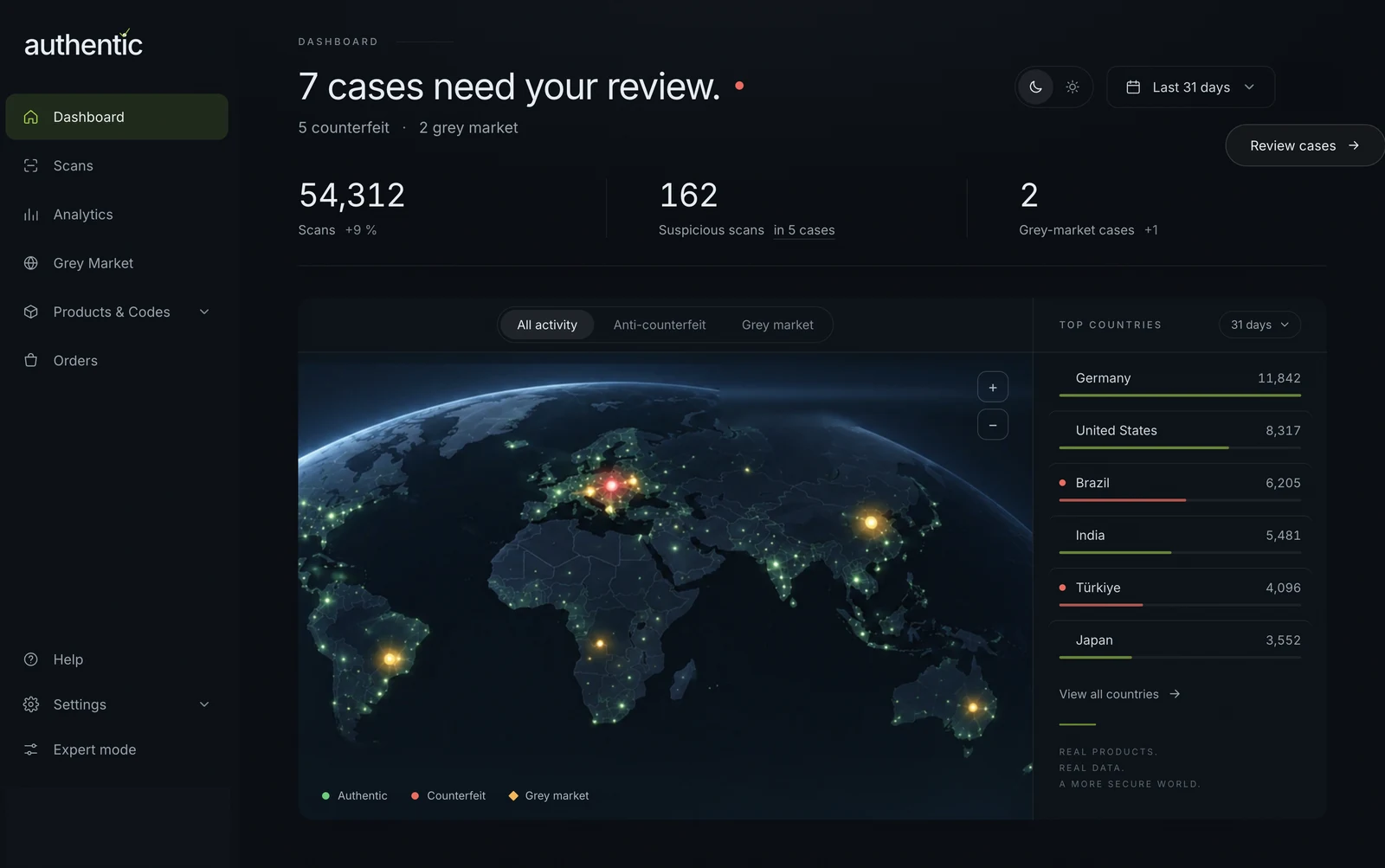
Jedes Produkt trägt eine eigene Seriennummer, verknüpft mit seinen Produktdaten. Jeder Scan wird erfasst – mit Ort, Häufigkeit und jedem ausgelösten Alarm. Ihr Dashboard macht daraus Fälle zur Prüfung – Fälschungen und Graumarkt-Routen, Markt für Markt.
Was Ihnen ohne Daten pro Artikel entgeht.
Eine Chargennummer sagt Ihnen, was Sie produziert haben. Nicht, was danach passiert ist.
Das erste Anzeichen eines Problems kommt als Reklamation – Monate, nachdem das Produkt Ihr Haus verlassen hat.
✓ Jeder Prüf-Scan wird in dem Moment erfasst, in dem er stattfindet.
Ohne Datensatz pro Artikel muss ein Rückruf weit mehr umfassen als die betroffenen Einheiten.
✓ Jeder Artikel trägt seine eigene Seriennummer und Charge.
Sie wissen, was Sie ausgeliefert haben. Aber nicht, wo es tatsächlich geprüft wurde.
✓ Scans erfassen Ort und Zeit – pro Artikel.
Verstreute Meldungen ergeben nie etwas, auf das Sie reagieren können.
✓ Verdächtige Scans werden zu Fällen gebündelt, die Sie prüfen.
Vom Druck auf Ihrem Produkt bis zum Fall auf Ihrem Bildschirm.
-
01 · Druck
Eine Seriennummer pro Artikel
Wir drucken die Codes mit Crypto-Optical Technology, jeden mit eigener Seriennummer – als Etikett oder integriert in Ihr Label-Design.
-
02 · Verknüpfen
Produktdaten verbinden
Jede Seriennummer wird mit ihrem Produkt verknüpft: Artikel, Charge, Produktionsdatum und Zielmarkt.
-
03 · Scan
Überall geprüft
Prüfer, Distributoren und Kunden scannen mit jedem Smartphone. Jeder Scan wird erfasst: wo, wie oft und ob er einen Alarm ausgelöst hat.
-
04 · Prüfen
Fälle bearbeiten
Ihr Dashboard zeigt Scans nach Markt und im Zeitverlauf und bündelt verdächtige Scans zu Fälschungs- und Graumarkt-Fällen.
Jede Seriennummer weiß, zu welchem Produkt sie gehört.
Sie kennen die Charge.
Tausende Einheiten teilen sich einen Code. Sie kennen die Charge – mehr nicht.
Sie kennen das Produkt.
Jede Einheit trägt ihre eigene Seriennummer, verknüpft mit ihren Produktdaten. Jeder Scan gehört zu genau einem Produkt.
Bereit für den Digitalen Produktpass. Eine eindeutige Kennung pro Artikel ist die Grundlage der Produktpass-Vorgaben. Die Seriennummer auf jedem Code ist bereits diese Kennung – und derselbe Code kann den Pass tragen, sobald die Vorgaben Ihre Produktgruppe erreichen.
Mehr zum ProduktpassEin Datensatz aus Scans. Antworten für fünf Teams.
Nichts auszurollen. Die Daten stammen aus Prüfungen, die ohnehin stattfinden.
Die meisten Rückverfolgungsprogramme verlangen, dass jeder Partner in Ihrer Kette bei jeder Übergabe scannt. Das ist ein Rollout – neue Geräte, neue Prozesse und Monate bis zum ersten Ergebnis.
Ihre Produktdaten, verknüpft mit der Seriennummer jedes Artikels – Artikel, Charge, Produktionsdatum, Zielmarkt. Einmalig, bei der Produktion der Codes.
Prüf-Scans und die Fälle, zu denen sie gebündelt werden: wo ein Produkt geprüft wurde, wann, wie oft und ob die Prüfung einen Alarm ausgelöst hat.
Das Signal kommt aus Prüfungen, die Prüfer, Händler und Kunden ohnehin machen. Binden Sie Ihre Systeme an, wenn es hilft – bei LIQUI MOLY läuft die Lösung innerhalb der bestehenden Systemlandschaft –, doch nichts muss angebunden sein, bevor der erste Fall erscheint.
Über Track & Trace.
Was erfasst Track & Trace?
Jeden Prüf-Scan: wo der Code eines Produkts geprüft wurde, wie oft und ob die Prüfung einen Alarm ausgelöst hat. Da jeder Artikel eine eigene, mit seinen Produktdaten verknüpfte Seriennummer trägt, gehört jeder Scan zu genau einem bekannten Produkt.
Was ist Track & Trace mit authentic.network?
Track & Trace mit authentic.network zeigt, wo Produkte gescannt werden, nachdem sie das Werk verlassen haben: wo, wie oft und mit welchem Ergebnis. Jede Einheit trägt eine Seriennummer, verknüpft mit Artikel, Charge und Zielmarkt. Keine Partnerdaten nötig – geprüft mit jedem Smartphone, ohne App, in etwa einer Sekunde; offline mit der authentic App.
Müssen wir unser ERP- oder Logistiksystem anbinden?
Nein. Track & Trace arbeitet allein mit Prüf-Scans. Sie müssen keine Lieferketten-Ereignisdaten übergeben oder ein weiteres System integrieren, um zu starten.
Können wir sehen, wo eine bestimmte Charge gescannt wurde?
Ja. Seriennummern lassen sich mit Produktdaten wie Artikel, Charge, Produktionsdatum und Zielmarkt verknüpfen. So sehen Sie, wo Produkte einer bestimmten Charge geprüft wurden.
Ist das ein vollständiges Lieferketten-Tracking-System?
Es zeigt auf Basis von Prüf-Scans, wo Ihre Produkte im Feld geprüft werden – nicht Produktions- oder Versandereignisse. Deshalb braucht es zum Start keine Integration und ergänzt Ihre Logistiksysteme, statt sie zu ersetzen.
Was sind Fälle?
Verdächtige Scans werden zu Fällen gebündelt – Fälschung oder Graumarkt –, sodass Ihr Team wenige Fälle prüft statt Tausender einzelner Scans. Das Dashboard zeigt, wie viele Fälle zu prüfen sind und wo sie aufgetreten sind.
Welche Produktdaten müssen wir bereitstellen?
So viele, wie Sie in Ihrer Auswertung sehen möchten. Seriennummern lassen sich mit Artikel, Charge, Produktionsdatum und Zielmarkt verknüpfen. Der Zielmarkt macht Graumarkt-Fälle möglich; Charge und Produktionsdatum lassen Sie eine Charge verfolgen.
Können wir die Daten exportieren?
Ja. Scandaten lassen sich aus der Scan-Ansicht exportieren, sodass Ihr Team in eigenen Tools und Berichten damit arbeiten kann.
Funktioniert zusammen mit
Sehen Sie, wo Ihre Produkte landen.
Sagen Sie uns, welche Produkte und Märkte Sie zuerst sehen möchten. Oder starten Sie mit dem Sample Kit – ein Original-Code und ein perfekter Nachdruck – und erleben Sie die Prüfung, mit der jeder Datenpunkt beginnt.
Echte Wirkung.